AVOID HEADACHES BY ESTABLISHING A POLICY OF AUTO-START
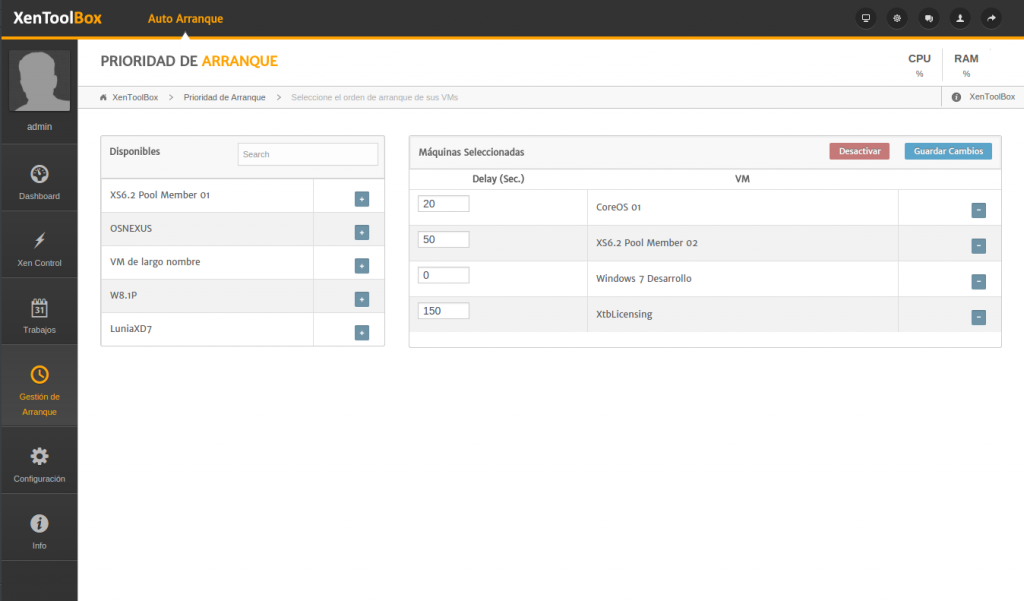
XenToolBox incorporates a simple management system by self-starting. The user can select and configure the VM for which you would like to set the auto-run function as well as de order in which you would like the VM of the Pool to be run. Simply put the VM in a list, ordering them by priority, being the VM with the highest priority the first on the list. The auto-run order can be modified at any time, depending on the user´s needs.

KEEP ORDER AFTER AN UNPLANNED SHUTDOWN
Secure the infrastructure of your Pool to a blackout of their VM, for example, caused by a power failure.
Plan an auto-run policy establishing a delay for the start of each VM. During the delay, all the resources and services that the machine needs are enabled during the delay, and ensuring that they are ready at boot time
XenToolBox auto-run function gets priority over the auto-start function that Xen sets by default. When we include a VM in a XenToolBox boot planning, the auto-start function gets deactivated. In the same way, when a VM is deleted from a XenToolBox boot planning, the auto-start function that was set in Xen, gets re-activated.